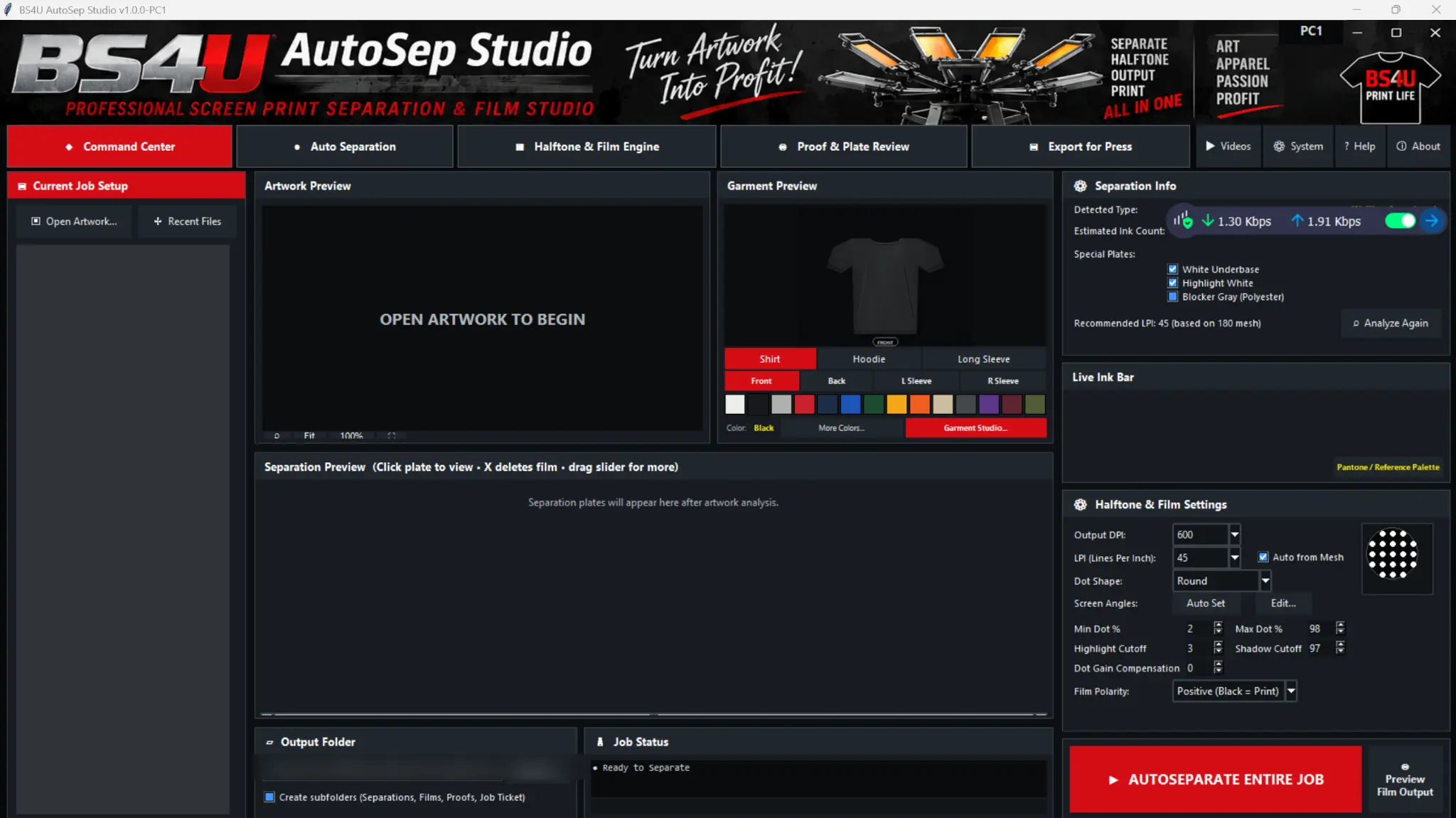
BS4U AutoSep Studio — Holiday Special (up to 3 PCs)
Original price was: $499.00.$399.00Current price is: $399.00.
Holiday Special: $399 (normally $499) for use on up to 3 Windows PCs in your shop, Oct 29, 2026 through Jan 1, 2027. One-time purchase, lifetime license for the purchased version, one year of updates and email support. You’ll receive up to 3 signed license files, one per PC. Send one activation request from each PC. Windows 10/11, 64-bit. Four separation methods, optional offline background removal, selective plate merging, FilmRIP and shop-management tools. Instant automatic 10-day trial. One year of updates and email support. 30-day purchase refunds, including after activation. The installer isn’t code-signed yet, so Windows may show a SmartScreen warning. Paid licenses are activated offline with a signed license file.
What happens after you buy
- Your order confirmation email includes your installer download link.
- Install AutoSep, open License & Updates and choose Create Activation Request. This saves a .bs4ureq file.
- Email the .bs4ureq file to support@bs4uautosepstudio.com with your order number and purchase email.
- Our support team emails your signed .bs4ulic license file back within 24 hours, Monday through Friday. Choose Import License, then Validate License, and confirm VALID.
Holiday Special: send one activation request from each PC (up to 3). Each PC gets its own license file.
Description
Separation, live plate review and film output in one program.
A one-time license for one authorized Windows computer. Includes one year of updates and email support; the purchased version continues working afterward. Windows 10 and Windows 11, 64-bit.
Optional offline background removal
Preview removal of edge-connected color backgrounds in the main artwork window. Adjust tolerance and feathering, apply or cancel, save a transparent PNG, or restore the original. This color-based tool is not an AI subject cutout.
Four separation methods
Choose Spot Color, Simulated Process, CMYK Process or Index. Artwork Doctor inspects source concerns; AutoSep Advisor compares methods and press fit with mesh/LPI guidance. CMYK includes black-generation/UCR, tone and total-ink controls plus optional compatible external ICC/ICM conversion.
Control the plates before output
Select nonadjacent plates, merge chosen colors, reorder plates and inspect individual films and combined garment proofs. View, Export, Print and Reprint preserve the current live plates without rerunning automatic separation. Garment workflows support underbase, highlight white and polyester blocker gray according to settings and press capacity.
Integrated BS4U FilmRIP
Screened 1-bit film preparation, registration marks, film slugs, LPI/angle/dot controls and documented 600/1200/1440/2400 DPI settings. Standard, Heavy, Extra Heavy and Double Strike strategies work with saved profiles and installed Windows drivers. Printer, ink, film, driver and exposure need shop qualification; generic profiles are not certified combinations and two-pass printing may require accurate refeeding.
Business and production records
Command Center includes customers, quotes and invoices, payments, artwork approvals, costing, inventory and configured SMTP email, with optional IMAP and an EML fallback. QuickBooks/Xero CSV exports can also be reviewed in Excel; exports are not live synchronization. Use job history, batch exports, production recipes, Master Job Packages and configurable daily backups while the app is running.
Artwork and output
Open PNG, JPG, TIFF, BMP, WEBP and PSD artwork for production preparation. PSD import is not a full Photoshop editor. Export grayscale TIFF separation masters, screened TIFF films, PNG proofs and PDF/text job tickets. Core local production works offline; email and online resources need configuration and connectivity.
Limited Early Access — read before purchase
The application and installer aren’t code-signed yet; code signing is pending. Paid licenses are activated offline with a signed license file that we send you. That file is what “signed” refers to, not the installer. Your installer download link comes with your order. If Windows shows a publisher or SmartScreen warning, contact support for verification guidance before continuing; do not disable security protections.
Advisor/QC scores and screen proofs guide operator review rather than predict measured press accuracy. Qualify CMYK, Index, ICC and physical output for your shop.
Download the free 10-day trial instantly. The trial starts automatically on first launch on an unlicensed PC. No invitation, trial checkout or manually issued trial license is required. Download the trial.
Start Here: Download, Install & Activate
- After your payment is confirmed, download the installer from the link in your order confirmation email or on the order-received page shown after checkout. If you don’t see a download link, email support@bs4uautosepstudio.com with your order number and we’ll send it.
- Extract the complete installer ZIP, close AutoSep, and install the update. Back up existing jobs and settings first.
- Open AutoSep. The free 10-day trial starts automatically on an unlicensed computer; existing paid activation is preserved.
- For your paid license, open License & Updates → Create Activation Request. Email the .bs4ureq file with your order number and purchase email to support@bs4uautosepstudio.com. Import the returned .bs4ulic file and validate it. The Holiday Special covers up to 3 PCs. Send a separate request from each PC, and we’ll return a separate license file for each one.
Start Here: Customer Quick Start · Watch the six training videos · Activation & troubleshooting
30-day refunds, including after activation
Request a full refund within 30 calendar days of purchase, including after download, installation or activation. Email support@bs4uautosepstudio.com with your order details. Refunded licenses are canceled. Read the 30-Day Refund Policy · Terms of Sale · Software License.